Integrating AI with legacy systems: patterns and pitfalls for UK businesses
Why integration is the hard part
Off-the-shelf middleware is one way to connect existing business systems with AI services. Bespoke API development is needed in a minority of cases. The decision is rarely "build or buy" any more. It is usually "which integration pattern fits this use case, and what is the smallest integration we can deliver that proves the value." This article sets out the three patterns most commonly used in UK businesses, the common failure modes, the anti-patterns to avoid, and the data compliance hooks that need to be in place at the integration layer.
One discipline applies to all three patterns: audit existing integrations and licences before procuring anything new. Most UK SMEs have at least three or four AI capabilities already paid for through M365, Google Workspace, Salesforce, HubSpot, or Xero subscriptions. A 30-minute review of what is already licensed is the cheapest piece of integration work you will ever do, and it routinely removes 30 to 50% of the new spend on the proposed roadmap.
Three integration patterns and when to use each
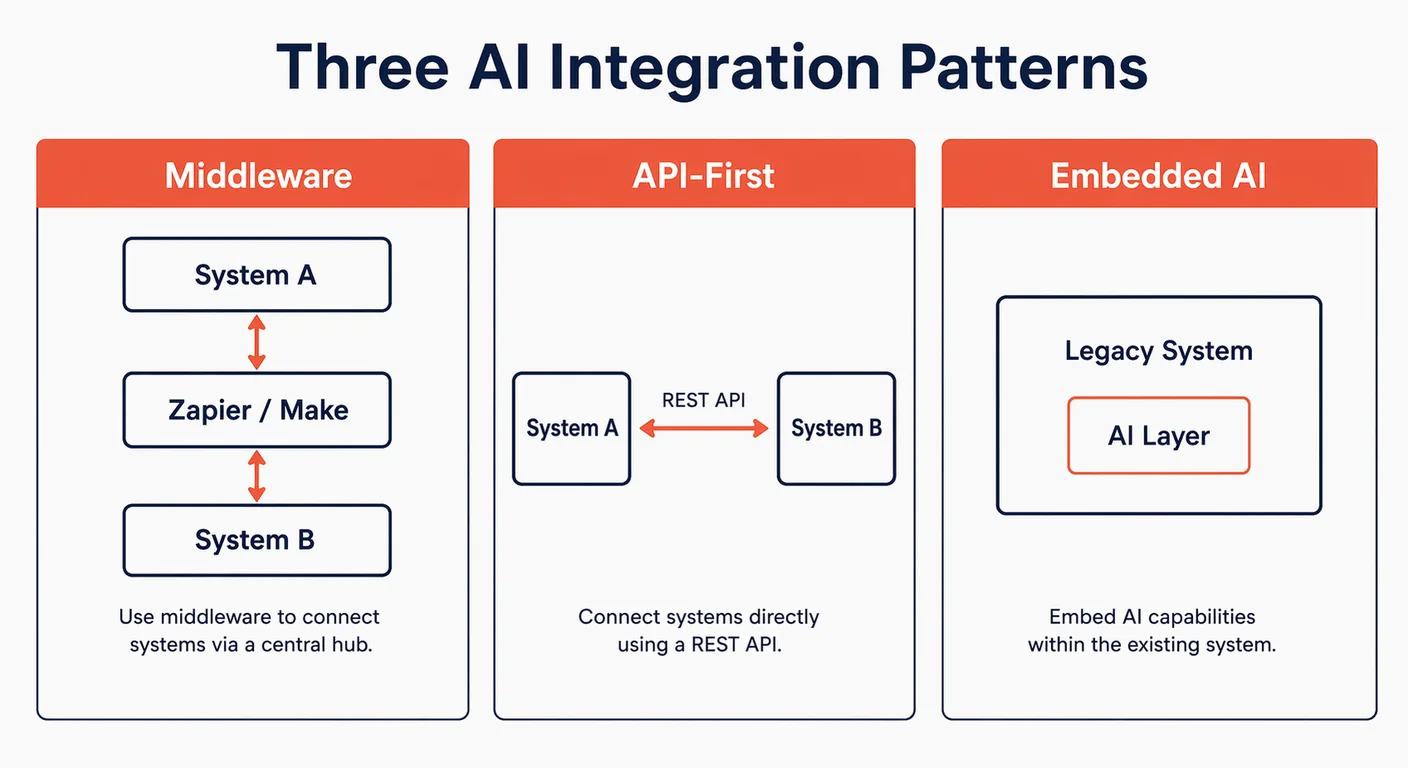
Every AI integration in a UK business sits in one of three patterns: middleware (also called iPaaS, integration platform as a service), direct API integration, or embedded AI delivered by the platform vendor itself. Knowing which pattern fits a use case before any procurement decision is made avoids most of the rework that derails AI projects.
| Pattern | Best for | Skill required | Time to deploy |
|---|---|---|---|
| Middleware / iPaaS | SaaS-to-SaaS workflows, periodic batch processing | No-code, operations lead | Days to weeks |
| API-first | Real-time, bidirectional, high-volume flows | Developer required | 2 to 8 weeks |
| Embedded AI | Capability already in your platform stack | Configuration only | Hours to days |
Pattern 1: Middleware (iPaaS)
Use middleware when you have two or more SaaS applications that both expose APIs, and you need to move or transform data between them with AI as one of the steps. Middleware abstracts away the authentication, retry, and error-handling work that would otherwise be developer time. The leading options for UK SMEs are Zapier (lowest friction, trigger-and-action model, suitable for most no-code use cases), Make (more capable conditional logic, multi-step flows, better visual mapping), and n8n (source-available under a fair-code licence, self-hostable in a UK or EU data centre for compliance-sensitive environments).
A typical example: a UK logistics firm uses Make to pull new booking data from its transport management system every 30 minutes, summarise it with Claude or GPT, and write the summary plus a recommended next action into a Slack channel that the operations team monitors. No custom code. No developer time. Deployed in two days. Maintained by the operations lead, not by IT.
Budgeting: obtain current vendor quotations in the billing currency, with the tax basis and usage allowance stated. Zapier meters tasks and Make meters credits. n8n Community Edition can be self-hosted under its Sustainable Use Licence; budget separately for hosting, maintenance and any paid features. For most UK SMEs, the right starting point is Zapier; the migration path to Make or n8n only matters once flows become genuinely complex or data residency tightens.
Pattern 2: API-first integration
Use API-first integration when bidirectional, real-time data flow is required, when middleware logic becomes too constrained, or when the integration needs to handle volumes or latencies the middleware tier cannot. This requires a developer (in-house or contract) but does not require replacing the legacy system. The work is usually small: a few hundred lines of code wrapped around the AI vendor's SDK and the legacy system's REST API.
A typical example: a UK B2B services firm builds a custom AI qualification chatbot for its website. Conversations are processed by Claude. When a lead is qualified, the chatbot writes a new lead record into Salesforce via the REST API, attaching the full conversation transcript, the qualification score, and a tag identifying the assigned account executive. This integration takes a developer two to three weeks to build, costs in the region of £6,000 to £15,000, and runs reliably for years with minor maintenance.
API-first is also the right choice when the AI tool will take significant actions in the legacy system, such as creating records, triggering workflows, or sending external communications. The middleware tier can handle these actions, but at scale the code path through middleware adds latency and obscures error handling. Direct API integration is more transparent and easier to debug when something does break.
Pattern 3: Embedded AI (vendor-provided)
Use embedded AI when your core platform has already added AI capability as a native feature. For many UK SMEs, the right first step is to use the AI already included in their existing subscriptions before buying separate AI tooling. Microsoft 365 Copilot, Google Gemini for Workspace, Salesforce Agentforce, HubSpot's AI tools, Xero's analytics features, and Sage's AI add-ons are all examples. Where the embedded AI does the job, integration is not a project. It is a configuration change and a training session.
The discipline here is to audit what is already licensed before purchasing new tools. We frequently see UK SMEs paying for ChatGPT Business or Claude Team alongside an M365 Copilot licence, when Copilot would have covered 70% of the use cases on its own. The standalone tools layered on top often have their place, but they should be evaluated against what the platform vendor already provides, not in isolation. The annual saving from cancelling overlapping AI subscriptions typically pays for the integration work elsewhere on the roadmap.
Common failure modes and how to avoid them
The same handful of failure modes account for most integration breakdowns in UK businesses. Anticipating them at design time is significantly cheaper than diagnosing them after a production incident.
| Failure mode | What it looks like | Prevention |
|---|---|---|
| Stale data | The AI reads from a source updated irregularly and produces outdated outputs | Enforce data update cadences; document source freshness; alert when a source has not updated in N days |
| Permission drift | The AI tool loses access to a system after a password change or a permission update | Use service accounts with documented owners; set renewal reminders; never use a personal account as the integration credential |
| Brittle triggers | An automation breaks when the source platform changes its UI or API endpoint | Use platform-native API endpoints, not UI scraping; subscribe to vendor changelogs; test after every platform update |
| Data format mismatch | Data from System A is in a format System B cannot parse | Map data schemas before integration; include transformation logic; write contract tests for the boundary |
| Scope creep | The integration grows in complexity beyond what the team can maintain | Define scope clearly; document every data flow; assign a named owner; review quarterly |
The single most common failure in UK SME AI integrations is permission drift caused by using a personal user account as the integration credential. When that user leaves, changes role, or has their password reset, every integration that depends on their account stops. The fix is to insist that all integrations use a dedicated service account with documented owners and renewal dates. It is a one-line policy that prevents most production-incident calls.
Legacy system realities: what not to do
Some integration ideas sound reasonable in a meeting and become expensive failures in implementation. The patterns below are the ones to push back on hardest in scoping conversations.
- Do not attempt to replace a working ERP with an AI system. Integrate with it. The cost, risk, and disruption of replacing a functioning ERP dwarfs any productivity gain from AI, and there are very few business cases where the right answer involves replacing the system of record. The ERP holds the truth; the AI sits alongside it.
- Do not try to connect AI to a system with no API, unless you are prepared for the maintenance burden of UI automation, which is fragile by design and breaks every time the underlying system updates its interface. If the legacy system has no API, the right move is usually to extract the data into a system that does (a database, a data warehouse, or an intermediate SaaS layer) and integrate from there.
- Do not build a custom integration when a middleware tool would work. Custom code is more expensive to build, more expensive to maintain, and more dependent on the original developer than a middleware integration that any operations team member can update. Reach for code only when middleware genuinely cannot do the job.
- Do not allow an integration to become undocumented. "Only Dave knows how it works" is a risk register entry, not an architecture. Every integration needs a written specification, a named owner, a documented renewal date for credentials, and a paragraph in the IT handover pack.
Data compliance considerations at the integration layer
Any integration that moves personal data between systems, particularly across SaaS boundaries, requires a UK GDPR review at the integration layer, not just at the AI tool itself. The data does not have to be sensitive for the obligations to apply. Personal data is broadly defined under UK GDPR, and most CRM, HR, and customer service systems contain it by default.
Three checks should be standard before any integration that touches personal data goes live. First, a Data Protection Impact Assessment (DPIA) should be completed for any new processing flow, particularly where AI introduces automated decision-making or profiling. Second, a Data Processing Agreement (DPA) should be in place with every AI vendor that receives UK GDPR-covered data, and the DPA should explicitly exclude the use of customer inputs to train future models. Third, data residency must be assessed at the integration layer. An AI tool with EU data residency is undermined if the middleware layer routes data through a US region. Each hop in the integration chain has its own residency to verify.
The FCA’s current approach, checked on 14 October 2026, relies on existing frameworks, including the Consumer Duty and SM&CR, rather than additional AI-specific regulation. The Duty requires good outcomes for retail customers, including fair value, appropriate communications and support. As a practical control, document how AI outputs affect customers, test for harmful bias and preserve enough records to investigate decisions. These controls are our recommendations, not a separate FCA rule requiring a particular explainability method or ISO certification.
Further reading and services
Integration is where AI either embeds into the business or sits in a corner unused. Getting the pattern right at the design stage is a far cheaper investment than redesigning after the first production incident. For practical implementation work on AI integration with your existing systems, see our AI implementation service. For more on the design, measurement, and adoption side of AI deployment, see the AI implementation section of the Knowledge Hub.
Frequently asked questions
- Can AI tools integrate with on-premise legacy systems, not just cloud SaaS?
- Yes, but the pattern is different. On-premise systems usually require either a database connector (reading directly from the underlying database where supported and licensed), a self-hosted middleware layer such as n8n that sits inside the corporate network, or an extract-and-stage approach where data is exported to a cloud-accessible location overnight. The complexity depends on the specific legacy system and the security posture, but on-premise integration is routinely delivered for UK businesses on Sage 200, older Dynamics versions, and bespoke line-of-business applications.
- What is the difference between Zapier, Make, and n8n for AI integration?
- Zapier is the most accessible: trigger-and-action flows, very large connector library, suitable for most no-code use cases. Make has more capable conditional logic, multi-step flows, better visual mapping, and tends to be cheaper at higher operation volumes. n8n is source-available under its Sustainable Use Licence, self-hostable in a UK or EU data centre, and the right choice for compliance-sensitive environments where data must not transit US-hosted infrastructure. Most UK SMEs start with Zapier and move to Make or n8n only when complexity or data residency requires it.
- Do I need a developer to integrate an AI tool with Salesforce or Dynamics?
- Not always. For most read-and-summarise or trigger-on-event use cases, middleware such as Zapier or Make can handle the integration without code, using the platform's native API connector. A developer is needed when the integration requires bidirectional real-time data flow, complex transformation logic, or actions that the middleware connector does not expose. Budget two to three weeks of developer time for a typical custom integration with Salesforce, Dynamics, or HubSpot.
- How do I maintain a data processor agreement when AI is processing CRM data?
- The DPA must be in place with every party that processes the data, not just the AI vendor. If middleware (Zapier, Make, n8n) handles the data in transit, that vendor also needs a DPA. The agreement should specify the categories of data processed, the purposes, the sub-processors used, the data residency, and explicit exclusion of using customer data to train future models. Review the DPA annually and any time the vendor materially changes its processing or sub-processor list.
- How long does a typical AI integration project take for a UK SME?
- A middleware integration with one or two SaaS systems takes one to three weeks of part-time work, often less if the use case is well scoped. A custom API-first integration takes two to eight weeks of developer time. An embedded AI deployment (configuring Microsoft 365 Copilot or Salesforce Agentforce) takes hours to days for the configuration plus a training session for the team. The longest stretch is usually the data preparation and governance work that should happen before any integration is built, which can take months for businesses with neglected internal data.
Get new briefings by email
The AI Consultancy newsletter delivers briefings and analysis for UK businesses. We use your address only to send it, and you can unsubscribe at any time.