The AI tech stack for UK SMEs in 2026: what to deploy and what to skip
Start with what you already own
An AI tech stack is the combination of AI tools a business deploys across its operations, typically covering productivity, automation, customer interaction, and specialist functions. The single most important rule for UK SMEs in 2026 is to audit what you already own before buying anything new. Most UK SMEs on Microsoft 365 or Google Workspace already have access to AI features they are not using: Microsoft Copilot, Google Gemini for Workspace, HubSpot's AI tools and Salesforce Agentforce have different licence and usage terms; check which features your existing subscription includes. The businesses that get the fastest returns from AI tooling start by activating what they own, train their teams on it, and only then evaluate additional specialist tools.
The government’s AI Adoption Research reports that 85% of AI adopters used natural language processing and text generation. That is not the percentage buying off-the-shelf systems. Among current and prospective users, 65% planned to implement off-the-shelf applications in the next 12 months. Use the findings as context for comparing existing tools with a build, not proof that every SME should buy the same stack.
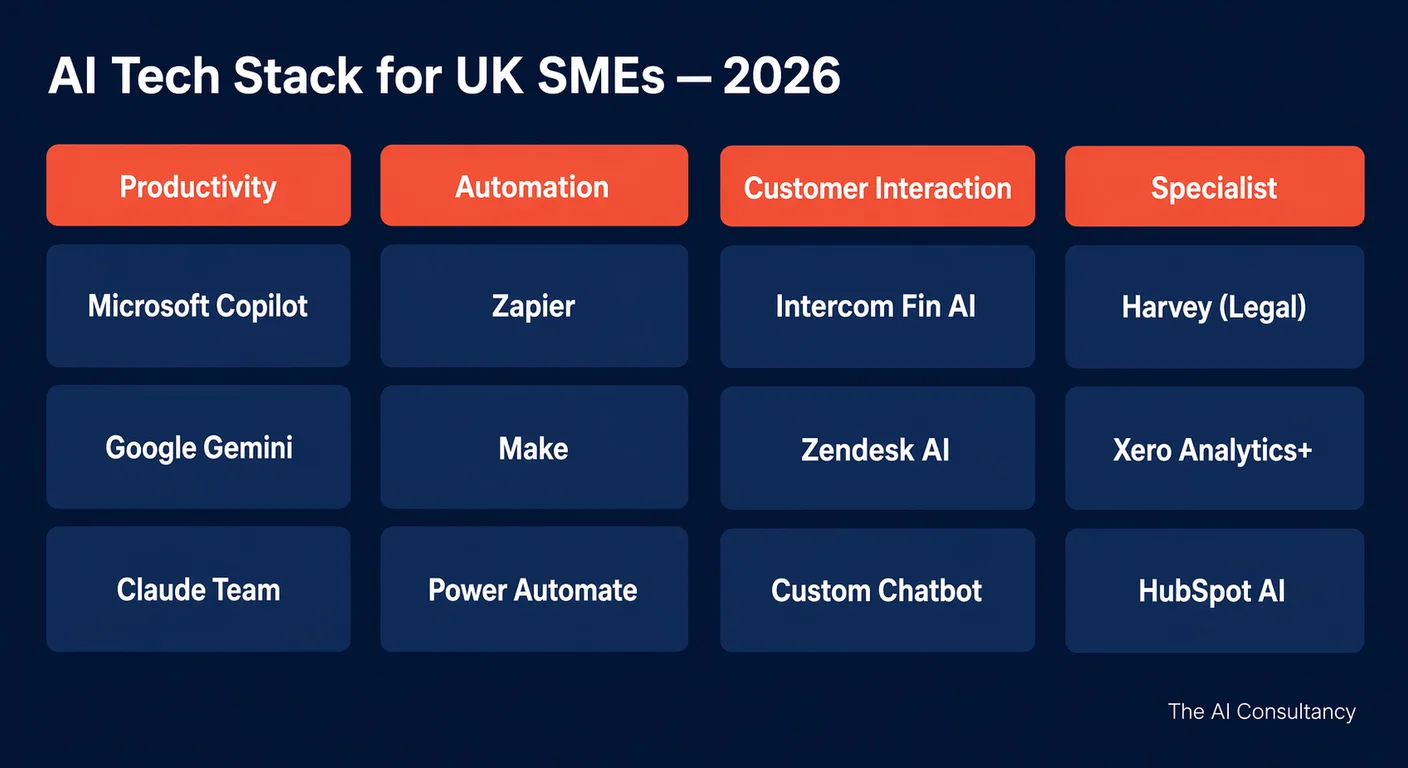
This article organises the 2026 AI landscape into four categories: productivity and writing, workflow automation, customer interaction, and specialist tools by sector. For each, it sets out the realistic options, which to start with, and what to avoid.
Category 1: Productivity and writing
Productivity and writing tools help individuals and teams produce better written output faster, summarise long documents, draft client communications, and pull insights out of spreadsheets and meetings. This is the category most UK SMEs should activate first because the tools are already in their stack and the productivity gains are easiest to demonstrate.
Compare Microsoft 365 Copilot, Gemini in Google Workspace, Claude Team or Enterprise, and ChatGPT Business or Enterprise against the work your team needs to do. Claude Team Standard is £18 per seat per month billed annually or £22.50 monthly, including 20 per cent VAT on the UK pricing page checked on 14 October 2026. Gemini features are included in Workspace Business and Enterprise subscriptions, with access varying by edition; an optional AI Expanded Access add-on raises limits. ChatGPT Business includes SAML SSO and is distinct from Enterprise. Confirm each vendor's current plan, billing currency, tax basis, data terms and access controls before comparing quotations.
Selection guidance: if your team is on Microsoft 365, start with Copilot. If your team is on Google Workspace, start with Gemini. The reason is integration depth, not model quality. Copilot reads your Outlook, Teams, SharePoint, and Excel files in context. Gemini reads your Gmail, Docs, Drive, and Meet recordings. Claude and ChatGPT are excellent standalone tools and often have stronger general-purpose model capabilities for complex reasoning, but they sit outside the productivity environment your team is already in. Only purchase a standalone tool when the embedded option is genuinely insufficient (specific data governance needs, heavy prompt engineering work, or a use case the embedded tool does not yet cover well).
A practical pattern that works for most UK SMEs is to standardise on the embedded tool for the majority of staff and licence one or two seats of a standalone tool (Claude Team or ChatGPT Business) for the small number of users who do heavy prompt engineering, agent-building, or work that benefits from the longer context windows and more capable reasoning of the standalone models. This gives you the integration depth of the embedded tool for the daily use cases and the model capability of the standalone tool where you need it, without paying for both at scale.
Category 2: Workflow automation
Workflow automation tools connect AI decision-making to operational workflows: triggering actions when events occur, moving data between systems, and applying AI judgement at specific points in a process. This category is where productivity gains move from individual to team scale.
Shortlist Zapier, Make, n8n and Microsoft Power Automate against the required connectors, permissions, data flows and usage. Obtain a current vendor quote in its published currency and tax basis. For n8n, distinguish its source-available fair-code licence from unrestricted open source and include hosting and maintenance if self-hosting. Check which Power Automate capabilities your Microsoft licence includes before buying another tool.
Microsoft Power Automate deserves a specific note. Most M365 Business Standard and Premium plans include Power Automate capability that the business is already paying for and not using. Before purchasing Zapier or Make seats, check what your existing M365 licence provides. Power Automate has a steeper learning curve than Zapier but a lower marginal cost when you are already on M365, and it integrates natively with SharePoint, Outlook, and Teams without authentication overhead.
Selection guidance: Zapier is the right starting point for most UK SMEs because the breadth of connectors and the absence of any code requirement let an operations lead set up the first 10 to 20 automations without external help. Move to Make when you need genuine conditional branching, multi-step logic, or visual debugging of complex flows. Choose n8n when data residency or self-hosting is a hard requirement. Use Power Automate if you are already deep in the Microsoft ecosystem and your IT team will own the configuration. For more on selecting the right integration pattern for your specific use case, see our guide to integrating AI with legacy systems.
Category 3: Customer interaction
Customer interaction tools deploy AI for customer service, lead qualification, and support, typically as a chatbot, an inbound triage system, or an agent assist tool. The right choice depends on whether your queries are general or specialised, and whether your data is generic or proprietary.
Off-the-shelf platforms (Intercom Fin AI for mid-market customer service, Zendesk AI at enterprise scale, HubSpot's AI tools for SMB customer support) are appropriate when your customer service queries are broadly general, your knowledge base can be assembled from existing help centre content, and your team will maintain the tool with light configuration. They deploy in days to a few weeks, integrate cleanly with the supporting helpdesk software, and require no engineering. Cost is typically per-resolution or per-conversation and scales with volume.
Custom builds on Claude or GPT, deployed via Vercel, Supabase, or a hosted platform, are appropriate when your data is proprietary (so a generic AI cannot answer well without ingesting your specific corpus), your queries are highly specialised (financial product mechanics, regulated processes, technical product detail), or you need deep integration with your own systems. The cost is higher (typically £8,000 to £40,000 to build) but the recurring cost per conversation is usually lower than the off-the-shelf platforms once volume is significant. Custom builds also give you control over the prompt, the safety guardrails, and the brand voice, which matters for regulated firms and high-touch B2B businesses.
Category 4: Specialist tools by sector
Specialist tools serve a defined sector or function, often at higher prices than the general-purpose tools, and bring sector-specific knowledge or compliance pre-built. They are usually layered on top of the productivity and automation categories rather than replacing them.
| Sector | Example tools | Use case | UK-specific note |
|---|---|---|---|
| Legal | Harvey, Luminance | Contract review, due diligence, legal research | Check data residency; SRA guidance applies on AI disclosure to clients |
| Financial services | Xero Analytics, Sage Intacct AI, ChatGPT or Claude with retrieval | Cash flow forecasting, anomaly detection, financial summaries | FCA Consumer Duty (PRIN 2A) applies if used for client-facing decisions |
| Healthcare and dental | Clinical-specific tools only (Heidi Health, Tortus) | Clinical notes, scheduling, admin | MHRA and ICO guidance applies; do not use general-purpose LLMs for clinical data |
| HR | Factorial, Teamtailor AI, HiBob AI | Recruitment screening, onboarding, employee Q&A | Equality Act compliance; AI-assisted decisions require human review |
| Marketing | HubSpot AI, Jasper, Copy.ai | Content generation, campaign optimisation, SEO drafting | Output must be reviewed before publication; UK ASA rules apply to AI-generated claims |
The Bank of England and FCA’s 2024 survey received 118 responses. Of responding firms, 75% were already using AI and a further 10% planned to do so within three years. Among firms using AI, 84% reported an accountable person for their AI framework. Read the survey.
What not to buy
The following categories of AI tool should be approached with caution, regardless of how compelling the demonstration is.
- Tools from vendors who cannot confirm data residency. If the vendor will not put UK or EU data residency in writing, treat that as a hard stop for any business data the tool will process.
- Tools requiring API access to your entire data environment without a clear data processing agreement. Wide-scope access without a DPA is a UK GDPR violation in waiting. Insist on least-privilege access and a signed DPA before any integration goes live.
- Tools marketed primarily on saving "10x time" without independent verification. Productivity claims that are not backed by your own pilot data are marketing, not evidence. Require a two-week paid pilot with measurable success criteria before any annual contract.
- Tools that duplicate capability already in your existing stack. If Microsoft Copilot or Google Gemini already does 70% of what the new tool promises, the new tool needs to justify the remaining 30% on its own merits, not on an aggregate value proposition.
- Tools sold as "AI strategy" platforms with no clear narrow use case. Strategy is a service, not a piece of software. Be sceptical of vendors selling AI strategy as a SaaS subscription.
The evaluation checklist
Before purchasing any AI tool, work through the following six-point checklist. If you cannot answer all six clearly, the procurement is not ready.
- Does this capability already exist in tools we licence? Audit M365, Google Workspace, Salesforce, HubSpot, and Xero before buying anything new.
- Does the vendor have a Data Processing Agreement available? If yes, request and review it. If no, treat that as a hard stop for any data-touching use case.
- Where is data stored: UK, EU, or US? Confirm in writing. Note that "EU data residency" sometimes means "stored in the EU but processed in the US." Get specifics.
- Does the vendor's enterprise tier guarantee no training on our data? This must be in the DPA, not just the marketing material.
- What is the annual total cost including implementation and training? Per-user pricing is the headline; implementation, integration, and training are usually 20 to 100% on top.
- Who in our team owns this tool's governance and maintenance? If the answer is "no one," the tool will be unused or out of compliance within a year.
This checklist also intersects with the acceptable-use policy that should govern every approved tool. For the framework that turns an approved-tool list into a documented policy your team can sign off, see our guide to AI acceptable use policies for UK SMEs.
Further reading and services
The right AI tech stack for a 30-person UK SME in 2026 is usually a Microsoft 365 or Google Workspace foundation with Copilot or Gemini activated, a Zapier or Make automation layer, and one or two specialist tools chosen against the checklist above. The wrong tech stack is a portfolio of overlapping subscriptions chosen by individual departments without coordination, with no governance owner and no shared evaluation criteria. For practical implementation work on selecting, deploying, and integrating the right AI tools for your business, see our AI implementation service. For more on the integration, automation, and governance side of AI deployment, see the AI implementation section of the Knowledge Hub.
Frequently asked questions
- Should UK SMEs use ChatGPT Enterprise or Claude Enterprise?
- For most UK SMEs, neither is the right first purchase. The right first move is to activate Microsoft Copilot (if on M365) or Google Gemini for Workspace (if on Google Workspace), because the embedded integration with email, documents, and meetings delivers more day-to-day value than a standalone tool. Standalone Claude or ChatGPT Business becomes worthwhile when you have specific use cases the embedded tool does not cover, when you need the longer context windows of the standalone models, or when one or two power users do heavy prompt-engineering work. A typical pattern is Copilot or Gemini for the team and a small number of standalone seats for advanced users.
- Is Microsoft Copilot worth the additional cost for M365 subscribers?
- For most M365 Business Standard and Premium subscribers in 2026, yes, but only with structured rollout. The applicable Copilot Business licence, confirmed for your existing Microsoft subscription and current vendor quote, typically pays back within three months on time saved across email drafting, meeting summarisation, and document analysis, but only if staff are trained to use it. Without training, Copilot is one of the most under-used licences in UK SMEs. Run a four-week pilot with 5 to 10 users and a structured prompt library before rolling out to the whole team.
- Which AI tools store data in the UK?
- Storage and processing are separate questions, and few tools do both in the UK. As read on each vendor's documentation in October 2026: Microsoft covers Microsoft 365 Copilot under its Microsoft 365 data residency commitments for data at rest, which follow the tenant's geography. Google Workspace data regions offer the United States or the European Union, with no UK option. OpenAI lists the United Kingdom as a storage region for ChatGPT Enterprise and for its API, but runs inference only in Europe, the United States and the United Arab Emirates. As at 14 October 2026, AWS lists London (eu-west-2) in-region availability for Claude Sonnet 4.6 on bedrock-runtime, but the same model card gives its in-region endpoint as N/A. Confirm the endpoint and account access with AWS before relying on UK inference. AWS separately lists Claude Haiku 4.5 on bedrock-mantle for in-region inference in Ireland (eu-west-1) and Stockholm (eu-north-1). Storage, retention and transfers need separate assessment. Self-hosting n8n on UK infrastructure (AWS London, Azure UK South) keeps the workflow engine in the UK, although any AI model it calls is a separate question. Always confirm in writing as part of the DPA, not just from marketing pages.
- Can free versions of AI tools be used for business tasks?
- Free tiers of consumer AI tools (free ChatGPT, free Claude.ai, free Gemini) are not suitable for business tasks involving any internal, client, or personal data. The free tiers may use customer inputs to train future models, do not come with a data processing agreement, and do not satisfy UK GDPR requirements for processing personal data. Use them for general public knowledge queries only, and document this restriction in your acceptable use policy. For any business data, use the enterprise tier of the tool with a signed DPA.
- How many AI tools does a typical UK SME with 30 employees need?
- Most 30-person UK SMEs need three to five AI tools in total: one productivity tool (Copilot or Gemini), one workflow automation tool (Zapier, Make, or Power Automate), and one or two specialist or customer-facing tools depending on sector. More than five tools usually indicates uncoordinated purchasing rather than genuine need. The right number is whatever covers your prioritised use cases without overlap, with a named owner for each tool's governance.
Get new briefings by email
The AI Consultancy newsletter delivers briefings and analysis for UK businesses. We use your address only to send it, and you can unsubscribe at any time.